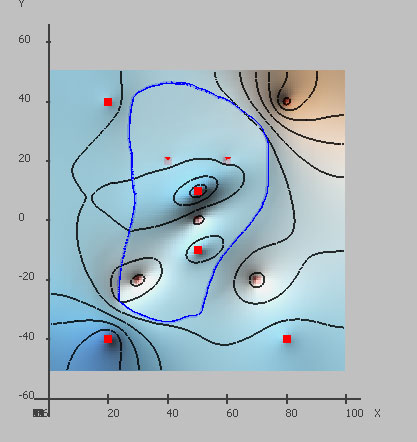
Here is the image of the resulting surface
Pic 1. Resulting surface
This result was obtained with "examples/surfit/curvs/area_completer.tcl" script.
00001 #
00002 # This script was generated with funner v2.1beta (www.gridding.info)
00003
00004 #
00005 # load plugins
00006 #
00007 load libsurfit[info sharedlibextension]
00008
00009 # remove all previous data and gridding rules
00010 clear_data
00011
00012 # set name of surface
00013 set map_name "map_area_completer"
00014
00015 # set solver
00016 set_solver "cg"
00017
00018 # set tolerance for solver
00019 set tol 1e-005
00020
00021 ##
00022 ## load initial data
00023 ##
00024
00025 # load points from text file
00026 pnts_read "11points.txt" "11points"
00027
00028 # load area from text file
00029 area_read "some_area.txt" "some_area"
00030
00031 ##
00032 ## construct grid
00033 ##
00034 grid
00035
00036 ##
00037 ## create gridding rules
00038 ##
00039
00040 # resulting surface at points = points values
00041 points "11points"
00042
00043 # resulting surface should tend to be constant or plane inside(outside) area
00044 area_completer "some_area" 1 2 30 2 1
00045
00046 # resulting surface should tend to be constant or plane
00047 completer
00048
00049 ##
00050 ## run gridding algorithm
00051 ##
00052 surfit
00053
00054 ##
00055 ## save results
00056 ##
00057
00058 # unload grid from memory
00059 grid_unload
00060
00061 # save surface to surfit datafile
00062 surf_save "map_area_completer.dat" "map_area_completer"
surfit: open source gridding and contouring software.